Track stocks and crypto, live.

yvest is a watchlist and portfolio tracker for stocks and crypto, with live quotes and clean charts. There's no account and no cloud copy of your data. It's free, open source, and runs on the web, desktop, and Android.
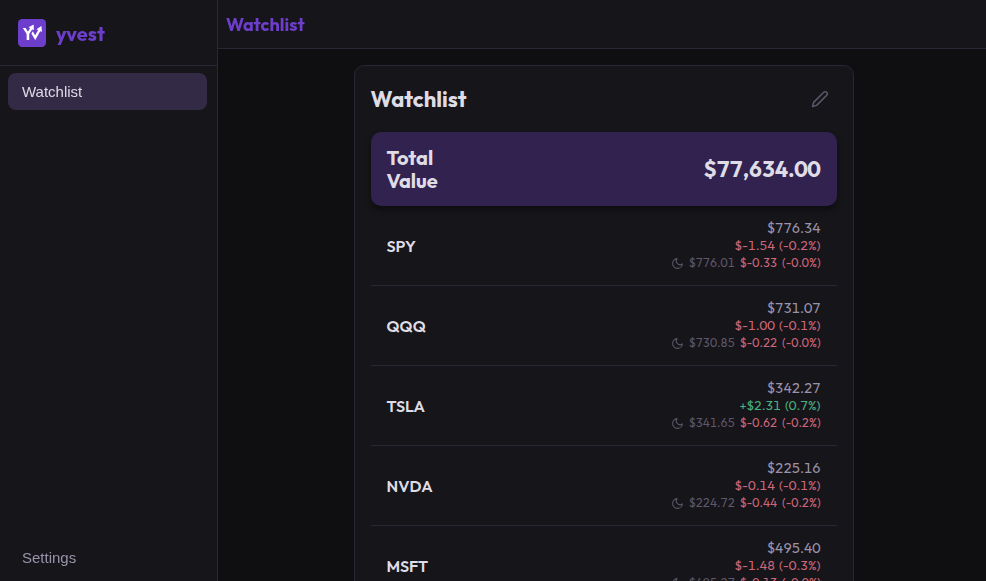
Screenshot of the yvest web app showing a watchlist of stock and crypto tickers with live quotes.

What you get

Private by default

No account and no tracking. Your watchlists and settings stay on your device: browser local storage on the web, a plain file on desktop and Android.

Watchlists

Group the tickers you follow into as many watchlists as you want, and switch between them in a tap.

Live quotes

Quotes come from Yahoo Finance and refresh about every ten seconds while you're watching. Pre- and post-market prices show up right on the row when available.

Charts

Line and candlestick charts with seven timeframes from 24H to ALL, plus extended-hours sessions.

Portfolio

Add a quantity to any ticker and the portfolio page totals your positions, day change, and overall value in your currency, with a donut breakdown.

Symbol search

Find any stock or coin by name or ticker and add it instantly.

Themes & accents

Dark, light, or system mode, eight accent presets, and a full color picker if none of them fits.

Backup and restore

Everything exports as plain JSON you can import anywhere. On desktop, yvest can also write a daily backup to a folder you pick.

Cross-platform

One Rust codebase: native desktop, Android, and your browser.

Get yvest

The web app works right now, no install. Native packages below for when you want one.

Web app

Nothing to install. Open yvest right in your browser.

Open the web app

Linux (Flatpak)

Install from Flathub on any Linux distribution.

Coming soon

Windows

Download the installer (.msi).

Coming soon

Android

Install the native app on your Android device.

Coming soon

Self-host

yvest is open source. Run the whole app with one compose file.

See docker compose

FAQ

What makes yvest unique?
yvest is built on a different deal than most free trackers. No account, no tracking, and no cloud copy of anything: your watchlists and portfolio live on your device, and they leave it only when you export a backup yourself. The whole app is open source under MIT, so anyone can read exactly what it does, and you can run your own instance with one compose file if you'd rather not depend on this site at all. And it's one Rust codebase compiled three ways: a native desktop app, a native Android app, and a web app that runs in any browser. Free trackers normally pay their bills with your data. This one never collects it.
Where does the data come from?
Quotes and charts come from Yahoo Finance. The desktop app talks to Yahoo directly. On the web, this site's server fetches the data and hands it back, so your browser never connects to Yahoo itself.
Can I trade from yvest?
No. yvest is for watching the market, not trading it. There's no broker connection and no way to place an order: it reads quotes and draws charts. Do your actual trading wherever you already do it.
How do I get my data onto another device?
Export a JSON backup in settings and import it on the other side. There's no sync service because there are no accounts to sync to. On desktop you can also point yvest at a folder and it writes a daily backup there automatically.
What happens if I clear my browser data?
Your watchlists go with it. On the web everything lives in your browser's local storage, and there's no server copy to restore from. That's the tradeoff for not having accounts, so export a backup now and then; it's one file and imports in two clicks.
Is it really free? What's the catch?
Yes. It's MIT licensed, no ads, no pro tier. yvest can't sell your data because it never collects any, and a tracker with no revenue model has no reason to nag you.
Can I use yvest without trusting your server?
Yes, a few ways. Run the web app yourself: it's one compose file. Use the desktop app, which talks to Yahoo directly and never touches this site. Or keep using the hosted instance over Tor or I2P, and the desktop app can also fetch quotes through a SOCKS proxy. The code is open, so you don't have to take anyone's word for any of this.